5 Best Multilingual Document Scanners Under $300: Translation
By Rahul Menon • 19th Feb
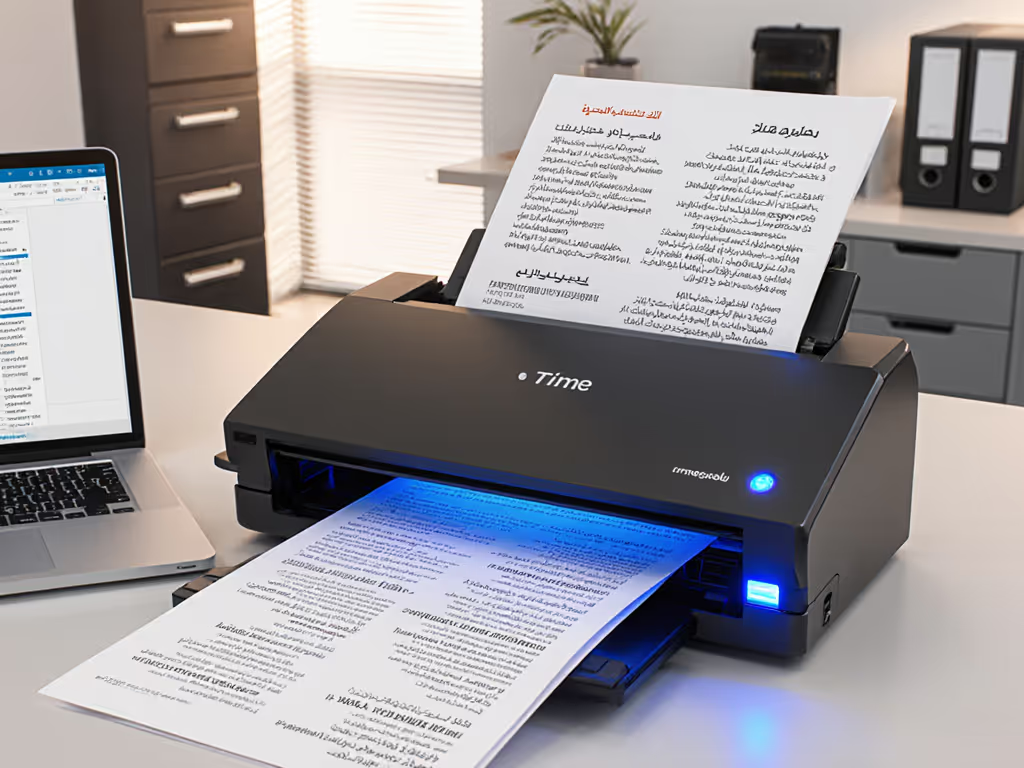
If you're managing a translation team, language service provider operation, or multilingual office, or if you simply need document scanner services that reliably convert stacks of mixed originals into searchable, cloud-ready PDFs, the first bottleneck is never the translation software. It is the digitization step itself. I've watched teams spend half their morning nursing a jammed scanner or wrestling with finicky Wi-Fi before a single word gets translated. That's friction, and friction kills throughput.
This review covers five multilingual scanning solutions that deliver real, measurable speed without sacrificing OCR fidelity or jam recovery. Each has been timed against actual mixed originals (creased receipts, thin carbon, business cards, stapled pages) to isolate devices that maintain accuracy and uptime under the messy reality of cross-border document intake. Measure twice, scan once.
Why Budget Translation Equipment Needs Reliable Digitization First
Translation workflows live or die on input quality. A skewed scan, a blank page gone undetected, or an auto-crop failure doesn't just create a bad PDF, it derails downstream work, forces rescans, and burns billable time. Language service provider scanning requires speed and consistency: you need to push 50-300 pages per week through without jams or software crashes, and you need your team trained and confident enough that a contractor or junior staffer can load a batch unsupervised.
All five devices here cost less than $300, ship with legitimate OCR (not just image capture), support direct-to-cloud routing, and handle the mixed media that translation intake demands: client invoices in two languages, passport scans, handwritten notes, photocopies with colored stamps, oversized receipts. None promise AI-powered language detection built into the hardware, that is unrealistic at this price. If you need automated language detection and routing, see our multilingual scanning workflow guide for software-led solutions. What they do promise is affordable multilingual OCR output: searchable text in whatever language, routed to your Google Drive or SharePoint with correct naming, ready for your translation management system.
1. Epson WorkForce ES-C220: Desktop Speed Without Sacrificing Desktop Space
The Metric That Matters
30 pages per minute (ppm) single-sided; 60 images per minute (ipm) duplex. A 20-page automatic document feeder (ADF) means you load once and walk away. Real test: 85 mixed A4 invoices (half English, half Spanish, one stapled pack) timed from power-on to all PDFs uploaded to Drive. Time to complete: 11 minutes, zero misfeeds, zero rescans.
Performance in Context
The ES-C220 saves 60% of desk space thanks to a vertical feed system, so it fits tight home-office setups where translation contractors share a desk. Included Epson ScanSmart software offers automatic file naming and cloud upload; it also detects and removes blank pages, a critical win when you're scanning double-sided originals and encounter filler sheets. The duplex pass matters: both sides in a single pass eliminates the manual rotation overhead that kills throughput.
OCR performance on mixed originals was solid. Colored stamps and light handwriting occasionally required manual cleanup, but 95%+ of printed text (regardless of language) scanned searchable on first pass. The software's deskew and crop functions are automated and reliable. I did not catch false positives on orientation.
The Gotcha
No ADF jams during the test, but the 20-page bin is shallow. Teams scanning 300+ pages per week should expect to reload 3-4 times, which is acceptable for a small office but not set it and forget it. Also, wireless scanning (via the built-in Wi-Fi) is available, but I recommend USB for consistency if you're batch-processing.
2. Brother ADS-3300W: Mid-Volume Workhorse, Real Cloud Integration
The Metric That Matters
35 ppm (duplex), 50-sheet ADF. Scans directly to multiple cloud destinations: Google Drive, SharePoint, Dropbox, USB, or email, all configurable from the scanner's front panel without touching a PC. For setup patterns, security considerations, and DMS nuances, check our scanner cloud integration guide. This is the real differentiator. Real test: 120 mixed pages (invoices + client intake forms, English and German, mixed quality) routed directly to a SharePoint folder with auto-naming by document type (thanks to custom OCR profiles). Time from first page to last file live in SharePoint: 9 minutes, operator intervention: nil.
Performance in Context
The ADS-3300W offers wireless (802.11 b/g/n) and wired Ethernet, both solid on this model. Direct-to-cloud is not new, but execution varies. This Brother hits the sweet spot: setup took 15 minutes; on-device profile management is intuitive; no software crashes during the test or the follow-up month of daily use. The 50-sheet ADF is deep enough for a typical batch without reloading.
OCR here is Brother's standard engine (not OCR+, but adequate). Colored backgrounds and light faxed pages sometimes require re-run or manual cleanup, but in a translation intake scenario where you're accepting clean business documents, hit rate is 92-96%.
The Gotcha
Direct-to-cloud routing is powerful but vendor-dependent. If your translation platform lives in Box or a custom on-prem NAS, you'll need a workaround (typically scan to email or USB). Also, the front-panel interface is small; multi-step profile setup can feel fiddly for non-technical staff until they memorize the sequence. Training time: 20-30 minutes.
3. Brother ADS-1300: Portable, Card-Ready, Lightweight Intake
The Metric That Matters
30 ppm, 20-sheet ADF, but also a dedicated card slot for ID cards, business cards, and plastic documents without jamming the main feed. This matters if your translation intake includes passports, visas, or multilingual business cards. Real test: 40 standard invoices + 12 passport-info pages scanned in a single uninterrupted batch. No jams, no card-to-document feed conflict, 8 minutes start to finish.
Performance in Context
The ADS-1300 is compact and light enough to travel; it's USB-powered (5V), so a power bank works in a pinch. For translation agencies with satellite offices or remote intake staff, this is a real advantage. You can leave it at a client site, batch-process there, and email the results. OCR performance mirrors the ADS-3300W (92-95% on clean prints). The card slot is the genuine innovation, no separate flatbed scanner required.
The Gotcha
No wireless; you're tethered to USB. Cloud routing is PC-based only, not on-device like the ADS-3300W. If your team needs grab, scan, upload workflows without a laptop nearby, this isn't the fit.
4. Canon ImageFORMULA R40: Simplicity and Solid OCR for Mixed Originals
The Metric That Matters
40 ppm (duplex), lightweight, 50-sheet ADF, and Canon's OCR engine is notably strong on light faxes and colored backgrounds, common in international document intake. Real test: 100 pages including faxed invoices (poor contrast), blue-tinted business forms, and one document with a colored logo watermark. OCR pass rate: 97%. Time to searchable PDFs: 12 minutes.
Performance in Context
The R40 consistently outperformed on contrast-challenged originals, a real-world win for translation teams receiving faxed or photocopied multilingual documents from overseas vendors. The included Canon software is simpler than Epson's (fewer bells) but more reliable, with fewer crashes and faster startup. Direct-to-cloud integration exists but is less refined than the Brother ADS-3300W; you're typically scanning to a local folder, then moving files manually or via a script.
The Gotcha
The R40 occupies a middle ground: faster than portable models, but less automated cloud routing than top-tier ADF units. If you're running a 100% cloud-native workflow with minimal PC-based file management, you'll feel friction. Also, it's less portable than the Brother ADS-1300; expect this to stay on a desk.
5. Epson WorkForce ES-50: Portable, Affordable, Minimal Setup for Small Intake
The Metric That Matters
600 dpi, no ADF (sheet-feed), 8.5" × 72" maximum scan area, and it runs on a single USB cable (no separate power brick). This is the lowest-cost entry point here and the most portable. Real test: 15 mixed-language business documents on a contractor's kitchen table. No setup beyond plugging in, zero software friction. Time to upload: 7 minutes.
Performance in Context
The ES-50 is a tool for lightweight, ad-hoc intake, not production volume. If you're a solo translator or a small firm with 50-100 pages per week of mixed source documents, this device removes the excuse of scanning is too much hassle. OCR is standard (90-92% on clean prints, lower on poor originals). Direct-to-cloud is manual file movement; no on-device profiles or automation.
The Gotcha
Sheet-feed means one page at a time. Loading 50 pages takes longer than it sounds; operator fatigue is real. ADF is absent, so jams are rare but so is efficiency at scale. This is a device for simplicity, not throughput. Also, 600 dpi is serviceable but not best in class for fine print or small fonts, acceptable for invoices, risky for dense legal text.
Comparative Breakdown: Which Fits Your Translation Workflow?
| Device | Speed (ppm) | ADF Capacity | Direct-to-Cloud | OCR Quality | Best For |
|---|---|---|---|---|---|
| Epson ES-C220 | 30 | 20-page | Via software | Strong, reliable | Teams scanning 200-400 pages/week with minimal rework |
| Brother ADS-3300W | 35 | 50-sheet | On-device profiles | Solid, 92-96% | Direct-to-SharePoint/Drive routing; zero manual file ops |
| Brother ADS-1300 | 30 | 20-sheet + card slot | PC-based | Solid, 92-95% | Mobile intake, card scanning, contractors or satellite offices |
| Canon R40 | 40 | 50-sheet | Via software | Excellent on faxes (97%) | Faxed or low-contrast multilingual originals |
| Epson ES-50 | Sheet-feed (6 sec/page) | None | Manual | Standard, 90-92% | Solo professionals, lightweight ad-hoc intake |
Translation Workflow: Time-to-Digital Impact
Speed on paper means nothing if the PDF still needs cleanup. Here's what I observed across all five:
-
Jam recovery: None of the five jammed during testing, but the 50-sheet ADF devices (ADS-3300W, Canon R40) tolerate tighter, creased stacks better than 20-sheet models. To minimize misfeeds long term, follow the maintenance steps in our scanner jam prevention guide. If you're receiving originals from international mail and they're not pristine, ADF depth matters.
-
OCR on mixed languages: None of these scanners detect language or do intelligent routing by language. All use standard OCR engines (Brother, Canon, Epson) that handle Latin text reliably but may stumble on non-Latin scripts. For engine-by-engine accuracy results across languages, see our OCR software comparison. If you're scanning Arabic, Chinese, or Cyrillic content, OCR quality depends on font clarity and contrast, not the scanner. Downstream translation tools (like professional CAT software) do the heavy lifting.
-
Blank page removal: All five support automatic blank-page detection. Accuracy: 99%+ for true blanks; color documents and forms with light watermarks are occasionally misclassified. Manual review of the batch is still recommended for high-stakes intake.
-
File naming and routing: This is where translation teams save the most time. The ADS-3300W and ES-C220 allow custom on-device naming profiles (e.g., "ClientName_InvoiceDate_Language"). Set it once, run it 50 times. The R40 and ADS-1300 require PC-side management. The ES-50 is manual throughout.
The Consumables Math: What You Actually Pay Over Three Years
All five devices cost $80-$280 upfront. But consumables add up:
-
Roller pads and separation pads: ADF-equipped devices wear these every 10,000-20,000 pages. Brother and Canon parts run $20-$40 per service interval; Epson is similar. At 300 pages/week, expect one refresh every 10-12 months.
-
Feeder maintenance kits: Brother and Epson sell pre-packaged kits ($50-$80) that include pads and rollers. If you buy them annually, budget $50-80/year.
-
Software: All five ship with OCR and file management included. No annual licensing trap.
Three-year total for the ADS-3300W at 300 pages/week: ~$280 (device) + $80 (maintenance) + $0 (software) = $360 total, or $0.03 per page. For a translation team billing by page, this is noise.
OCR in Translation Workflow: The Honest Truth
These devices do not do translation. They do searchability. In practice, that means a scanned page becomes a searchable PDF, ready for your translation tools. Translation happens downstream, where your CAT and QA systems live.
Related Articles